Library map
Tracks that sound alike appear close together in the web library's 3D galaxy. The first view looks at the whole galaxy from an angle. Each star represents a track, and stars with more plays shine brighter. Zoom in to see track titles and covers, or pick a star to play the track or start radio from it.
Drag to orbit. Right-drag, Shift-drag or drag with two fingers to pan the
camera. With the map focused, hold W/S to fly forward
or back, A/D to move sideways, and Q/E to move down or up. The arrow
keys pan, Shift with the arrow keys rotates, and 0 returns to the overview.
Use + and -, the wheel or pinch to zoom. The toolbar also offers fullscreen
and a shortcut to the current track. The animation layer and the system's
reduced-motion preference control camera transitions and the pulse on the
playing track.
Click or tap a star on either map to highlight it and open its track panel. The panel stays in place as the view moves and offers playback and radio actions.
Highlight a genre from the toolbar. Use the Layers menu to show or hide the queue route, covers, constellation links, nebulae, and animation. When stars overlap under the pointer, the closest visible star is picked. The lasso holds the camera still and selects every visible star whose projected centre falls inside the outline. The playback path uses distances in the active projection and keeps up to 300 tracks closest to the selection centre.
Use the projection button to switch between the galaxy and the Canvas 2D map. The browser also switches to 2D if WebGL 2 is unavailable or the context is lost. The desktop app opens the Canvas 2D map.
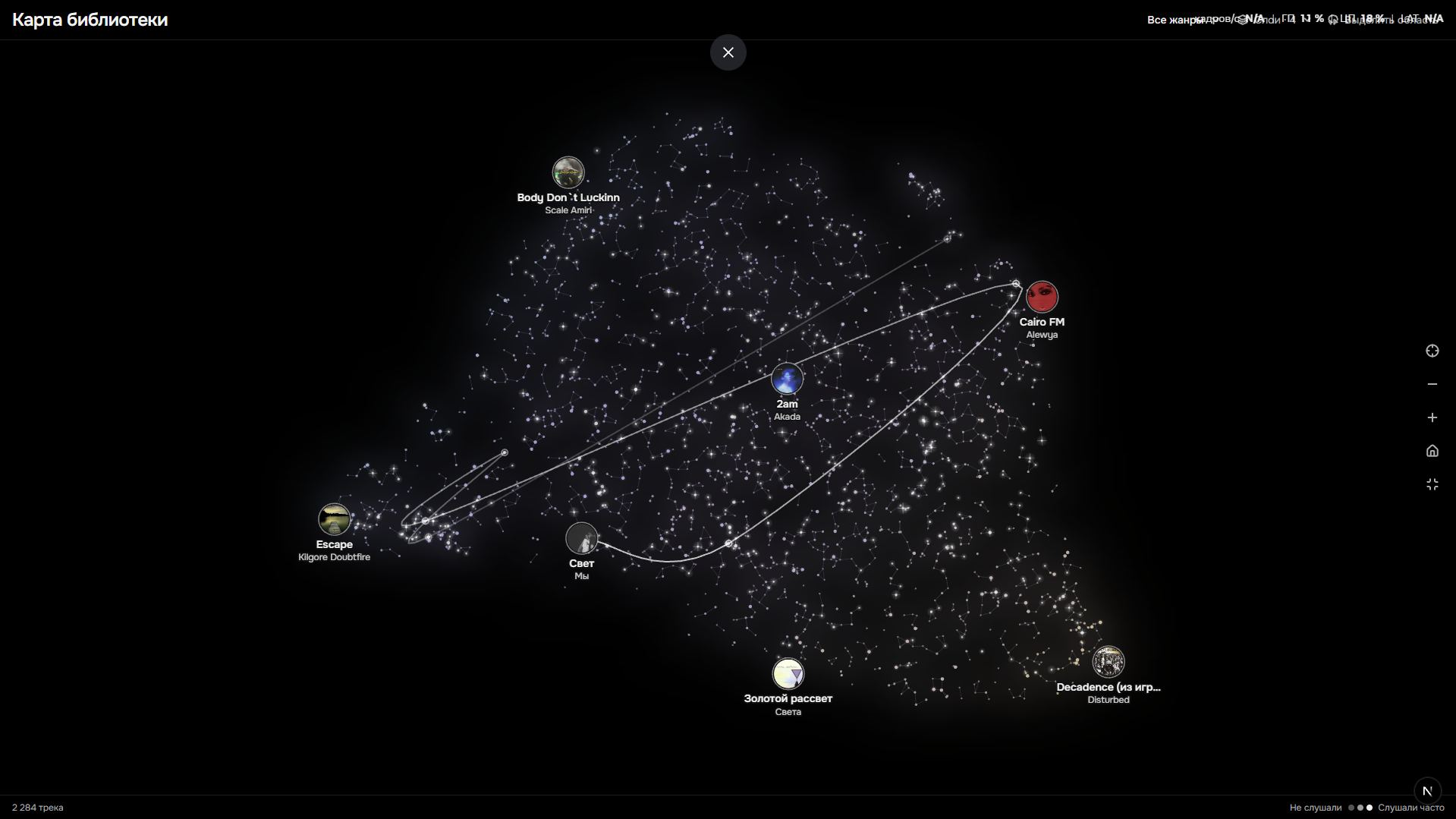
Which tracks appear
The map needs the recommendations module and MERT audio embeddings computed on the server. It includes successful embeddings that match the current model, window strategy, dimension, and audio hash. The mapped count can be lower than the library count while analysis is still running.
GET /api/library/map?projection=3d projects the audio-neighbour graph into
three dimensions and includes an x, y and z for each track. PCA initializes
all three axes from the embeddings and the graph optimizer works in 3D.
GET /api/library/map or ?projection=2d returns the existing 2D response with
x and y. Both responses report totalTracks and updating, and each
projection has its own React Query entry.
Saved coordinates
Migration 0017_library_map.sql adds a PostgreSQL cache shared by API instances.
It stores full-precision coordinates, track IDs and SHA-256 fingerprints of the
normalized audio vectors. Each projection has its own versioned cache key
for the current model and window strategy. Change LAYOUT_VERSION_2D or
LAYOUT_VERSION_3D in recommendations/map/persistence.rs when changing that
projection's semantics or saved representation.
The first request after an API restart restores the saved map. An identical set of track IDs and vectors reuses its coordinates without optimization or a cache write. Changes to titles, genres, popularity or listening history do not move points. An index that has not loaded yet never overwrites the saved map.
Rebuild rules
- Removing tracks preserves every surviving coordinate, even in a tiny library.
- If at least 80% of the current tracks have saved coordinates for the same audio vectors, they are fixed anchors. New or changed tracks are initialized near their saved audio neighbours and optimized for 80 epochs. Anchors retain their exact coordinates across the rebuild.
- With fewer than 80% unchanged anchors, the projection starts afresh from PCA with a fixed seed and stable index ordering, using 400 epochs (200 above 10,000 tracks). Maps with one to three tracks use PCA alone in 3D and evenly spaced positions in 2D.
- Changing an audio vector invalidates that track's anchor even if its ID stays the same. A different model, strategy or layout version starts a separate map.
Changed maps are saved in one transaction. A transaction advisory lock prevents concurrent API instances from building and writing the same cache simultaneously. Invalid cache payloads are discarded and rebuilt.
While a background update runs, the API serves the previous map with
updating: true. The frontend checks every 15 seconds while the map is empty
or updating, and every minute while a nonempty map is still missing tracks.
The camera keeps its position when coordinates update. The home button fits
the updated map.
Separated audio clusters can form islands. Each library can have a different projection.